Marquee Scrolling Text Generator for Blogger

In HTML, allows you to have a marquee scrolling text and images. Tents are perfect for your Blogger page, allowing you to do things that normally require JavaScript (which does not allow Blogger).

You can create a Blogger marquee to scroll horizontally or vertically. You can also change other things as the speed at which it moves.

Use the form below to generate the code for Blogger marquee. Simply select the values ​​you need, click "Generate Marquee and Preview", then copy and paste in your profile page.The widget is originally developed by code-generator.net, i just changed something in the widget. 


How to Install this on blog?

I have to write two set of instructions for each steps, as some of you are using the default layout, and some of you are using the new layout. So, let's see how to install this cool widget in your blog..


Step 1:

If you're using the old Blogger interface: Go to Dashboard - Design - Page Elements - Add a Gadget.

Add a Gadget of HTML/JavaScript type.

If you're using the new Blogger interface: Go to Dashboard - Layout - Add a Gadget

2.Click on 'Add a Gadget' on the sidebar.

3.Select 'HTML/Javascript' and add the one of code given below

4. Now Click On Save 'JavaScript' You are done. 

Blogger Falling Object Generator

You can show the falling objects or graphics to your Blogger profile page. This generator falling objects to specify an image of your choice. Once you paste the HTML code to your Blogger profile page, you see several copies of the image of all that fall on the page!

For this to work, make sure you specify the exact location of an image. Also note that some browsers can not display the objects that fall as planned.The widget is originally developed by code-generator.net, i just changed something in the widget. 


How to Install this on blog?


I have to write two set of instructions for each steps, as some of you are using the default layout, and some of you are using the new layout. So, let's see how to install this cool widget in your blog..


Step 1:

If you're using the old Blogger interface: Go to Dashboard - Design - Page Elements - Add a Gadget.


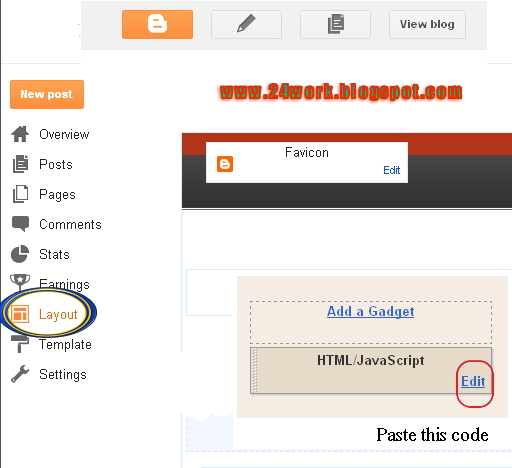
Add a Gadget of HTML/JavaScript type.


If you're using the new Blogger interface: Go to Dashboard - Layout - Add a Gadget


2.Click on 'Add a Gadget' on the sidebar.

3.Select 'HTML/Javascript' and add the one of code given below

4. Now Click On Save 'JavaScript' You are done. 


*  New Blogger Falling Object Generater  *


Blogger Falling Text Code Generate

Here's a cool way to get that "falling text" effect on your Blogger profile page. Elsewhere, you can use JavaScript for the effect of the fall of text - but not on Blogger. Fortunately, you can use a little HTML trick to get the same effect!

Use the form below to generate text fall into your Blogger profile page. You can then copy and paste the HTML code on your profile page.The widget is originally developed by code-generator.net, i just changed something in the widget.


How to Install this on blog?

I have to write two set of instructions for each steps, as some of you are using the default layout, and some of you are using the new layout. So, let's see how to install this cool widget in your blog..


Step 1:

If you're using the old Blogger interface: Go to Dashboard - Design - Page Elements - Add a Gadget.

Add a Gadget of HTML/JavaScript type.

If you're using the new Blogger interface: Go to Dashboard - Layout - Add a Gadget

2.Click on 'Add a Gadget' on the sidebar.

3.Select 'HTML/Javascript' and add the one of code given below

4. Now Click On Save 'JavaScript' You are done.  

Install Flash Animated Twitter Follow Me Widget for Blog

How to Install Flash Animated Twitter Follow Me Widget To Blogger / Blog / Websites

I have to write two set of instructions for each steps, as some of you are using the default layout, and some of you are using the new layout. So, let's see how to install this cool widget in your blog..

Step 1:


If you're using the old Blogger interface: Go to Dashboard - Design - Page Elements - Add a Gadget.


Add a Gadget of HTML/JavaScript type.


If you're using the new Blogger interface: Go to Dashboard - Layout - Add a Gadget


2.Click on 'Add a Gadget' on the sidebar.

3.Select 'HTML/Javascript' and add the one of code given below

4. Now Click On Save 'JavaScript' You are done.


<a href="http://24work.blogspot.com" target="_blank" title="Blogger Widgets"><img src="http://safir85.ucoz.com/24work-blogspot/cursor-24work-10.png" border="0" alt="Blogger Widgets" style="position:absolute; top: 0px; right: 0px;" /></a><object type="application/x-shockwave-flash" data="http://www.buzzbuttons.com/BUTTON4/twitbutton.swf" width="150" height="150"><param name="movie" value="http://www.buzzbuttons.com/BUTTON4/twitbutton.swf"></param><param name="allowscriptaccess" value="always"></param><param name="menu" value="false"></param><param name="wmode" value="transparent"></param><param name="flashvars" value="username=rohul786"></param><a href="http://24work.blogspot.com/" title="Blogger Widgets">Blogger Widgets</a><embed src="http://www.buzzbuttons.com/BUTTON4/twitbutton.swf" type="application/x-shockwave-flash" allowscriptaccess="always" width="150" height="150" menu="false" wmode="transparent" flashvars="username=rohul786"></embed></object>


And now click Save 


HOW TO INSTALL FLASH TWITTER FOLLOW ME BUTTONS ON YOUR BLOG?


1. Choose Any Flash Follow Me Button As You Want

2. Replace rohul786 With Your Twitter User Name

3. Customize Width And Height as You Need

4. Click on Generate Button and Finally Click on Add to Blogger Button to add this widget on your blog.


OR

5. Click on Get Code Button and Copy the code to use it.


Internet Download Manager 6.09 Build 3 Full Version with Patch Free Download


 Internet Download Manager v6.09. Fixed compatibility problems with different browsers including Internet Explorer 9 Final, Mozilla Firefox 4, 5, 6, 7, 8, 9, 10, 11 and Firefox 12, Google Chrome. Improved FLV grabber to save videos from web players on YouTube,  Google Video, MySpace TV, and other popular sites.
What is New in Version 6.09Build 3 Final
1. Added support for Firefox 11 and Firefox 12
2. Fixed a number of serious problems when downloading from youtube and other video streaming sites
3. Improved Advanced Browser Integration


Internet Download Manager (IDM) is a tool to increase download speeds by up to 5 times, resume and schedule downloads. Comprehensive error recovery and resume capability will restart broken or interrupted downloads due to lost connections, network problems, computer shutdowns, or unexpected power outages. Simple graphic user interface makes IDM user friendly and easy to use.
Internet Download Manager has a smart download logic accelerator that features intelligent dynamic file segmentation and safe multipart downloading technology to accelerate your downloads.
Internet Download Manager supports proxy servers, ftp and http protocols, firewalls, redirects, cookies, authorization, MP3 audio and MPEG video content processing. IDM integrates seamlessly into Microsoft Internet Explorer, Netscape, MSN Explorer, AOL, Opera, Mozilla, Mozilla Firefox, Mozilla Firebird, Avant Browser, MyIE2, and all other popular browsers to automatically handle your downloads.
Internet Download Manager supports proxy servers, ftp and http protocols, firewalls, redirects, cookies, authorization, MP3 audio and MPEG video content processing. IDM integrates seamlessly into Microsoft Internet Explorer, Netscape, MSN Explorer, AOL, Opera, Mozilla, Mozilla Firefox, Mozilla Firebird, Avant Browser, MyIE2, and all other popular browsers to automatically handle your downloads. You can also drag and drop files, or use Internet Download Manager from command line. Internet Download Manager can dial your modem at the set time, download the files you want, then hang up or even shut down your computer when it's done.
Other features include multilingual support, zip preview, download categories, scheduler pro, sounds on different events, HTTPS support, queue processor, html help and tutorial, enhanced virus protection on download completion, progressive downloading with quotas (useful for connections that use some kind of fair access policy or FAP like Direcway, Direct PC, Hughes, etc.), built-in download accelerator, and many others.
Version 6.09 adds IDM download panel for web-players that can be used to download flash videos from sites like YouTube, MySpaceTV, and Google Videos. It also features complete Windows 7 and Vista support, YouTube grabber, redeveloped scheduler, and MMS protocol support. The new version also adds improved integration for IE and IE based browsers, redesigned and enhanced download engine, the unique advanced integration into all latest browsers, improved toolbar, and a wealth of other improvements and new features.


How to Register IDM Must Watch This Tutorial


30Day Trail Problem Solve in this Video


1. Install idman609
2. Close Internet Download Manager in Tray Icon
3. Run Patch

Virtua Tennis PC Game Full Version Free Download


Tennis fans should be in heaven after playing Virtua Tennis.
Tennis isn't exactly one of those sports games that people get terribly excited over. You don't see any yearly tennis franchises out there, so a good tennis game is hard to find. Luckily, Virtua Tennis features an easy control scheme, great graphics, and exciting gameplay that will probably manage to rope in a few non-tennis fans along the way.
Because Virtua Tennis is a port of an arcade game, its main mode is nice and short. You pick one of several real-life tennis players, choose singles or doubles play, and move through several stages of increasing difficulty. There's also an exhibition mode that lets you choose a court, put two or four players on it, and play for kicks. You can also customize the rules, setting the number of wins required to end a match, disabling the advantage rule, and so on. Exhibition mode also serves as the game's best mode for multiplayer games, which are a real blast. The meat of the single-player game is in its questlike world-circuit mode. In the world circuit, you start out staring at a world map, as you do in Street Fighter Alpha 3's world-tour mode. Different spots on the map correspond to different challenges. Some are simple singles matches, some are doubles, and some are minigames in which you train. The training levels, which include activities such as aiming at bowling pins, lobbing tennis balls into cans, knocking boxes off the court, and aiming at a bull's-eye target painted on the court, are all pretty cool. Along the way, you'll be earning money, which can be spent in the tennis shop. In the shop, you can unlock extra tennis players for the game's other modes, purchase new outfits, and contract partners so that you can play in world-circuit doubles matches.
The control mirrors the old Nintendo Tennis game for the NES - you use one button for standard swings and another for lobs. Of course, you have significantly more control over the ball, as you can push in a direction while hitting the ball to aim it at different parts of the court. This lets you force the opposing player to run back and forth quite a bit. While it's pretty easy to judge the ball's trajectory and get to it when you're playing on the close side of the court, you'll have to get used to judging the ball's location using only its shadow when you're playing on the far side of the court, which makes for a slightly tougher match. But after a few matches, you'll get used to playing on both sides of the court. In one-player games, you can use an alternate camera angle that gives you a behind-the-back view of the action, but this makes it even harder to properly judge the ball.
The character models have a nice look to them. The players are realistic, with little features like fingers and teeth. Of course, these little touches are noticeable only during the replay mode, which shows a close-up of the action, using an exaggerated version of the blurring effect made popular by Metal Gear Solid. On the audio side, things like balls hitting rackets and on-court voices all sound very nice, but they're a bit marred by a few tracks of bothersome, poppy guitar-rock.
Tennis fans should be in heaven after playing Virtua Tennis. While the game doesn't exactly have a simulation-styled approach, it's definitely a blast to play, and the multiplayer and world-circuit options give it replay value regardless of how many controllers you have.


Processor= 500MHz
RAM= 64MB
Graphics= 16MB


What is Software Development Process?

System Development
                   System is the computerized solution for a set of Problem of an organization or a group of persons.
          Its development is divided mainly into four phases;
A. Analysis
B. Design
C. Coding
D. Testing & Maintenance   

(A) Analysis
                   This is the first Phase in which following major tasks are done.
1. Meeting with Client.
2. Finding all existing problems.
3. Selecting subset of problem that can be solved through computer.
(B) Design Phase
                   In this phase we deal with following Task are performed here;
1. Designing of Algorithms and flow Charts.
2. Determination of inputs, procedures, filing method and outputs.
(C) Coding
                   It is simply the typing of source program in a Selected IDE.
(D) Testing & Maintenance
                   In testing we check for verification and validation of program. Verification is the functionality check whether the program is running or not validation is the achievement of desired level of accuracy and precision. In Maintenance we perform following tasks;
1. Delivery of system to client.
2. Software/Hardware Changes are made.
3. Training of end users.
4. Away of doing a tasks.

What is Networking and Inter Networking


Networking and Inter Networking

Networking

Networking Devices are used for two purposes
1. To build a Network.
2. To extend the Network.
These exude LAN Card, Switches, Hub, repeater, cables and Bridge.


Inter Networking
Inter Networking Devices are used to link to deformfan
Types of Inter Networking Devices these are Router, Booster, Gateway, CSU, DSC extra


Network Operating System (NOS)

Network Operating System
An Operating System that manages the resources of every Node on the Network is called Network Operating System.
Example
          UNIX, Linux, Windows NT (New Technology)
The server Computer is the Real Place for NOS.

Protocol
          Protocols are the rule and resolution to convey information from one Computer to another. Some protocols are routable and same are not. Protocols are installing as standard for information exchange on every Node on the Network. There are install on client side and on sever side.
Example
          NA, NET, BUE, IE, TCP/IP Groper FTP extra 

Media
          There are two types of media
(1)  wires media
(2)  Wireless

Wires Media
In wires media we used toasted cable, to estate cable, coaxial cable and optical fibber.

Wireless Media
In wireless media we used redo value microbes and seta light System.